CardBull
Log in Start free Your account Open the web app

Hold up a card.
Know what it’s worth.

CardBull is an iPhone app for trading cards. Point your camera at a card and it tells you the name and today’s price. Works with Pokémon, Magic, Yu-Gi-Oh! and One Piece.

  • Free during launch, no card needed3 days free, no card needed
  • Free access with your invite, no card needed
  • Works in your browser today
  • iPhone beta free on TestFlightNow on the App Store
How it works

Every card scanner is fast.
Ours is too.

Hold up a card. In about a second you have its name, set, number, version and today’s price. Every scanner app is quick now, so here is what else this one does.

  • Snap
  • Continuous
  • Bulk Scan
  • Case check
  • Price check
  • Record
  • Barcode
For sellers

When a card sells, your phone tells you. With the profit.

Away from your table, or have a helper running it? The moment a deal is finalized, your phone gets a notification: what sold, how they paid and what you made on it.

  • Works for sales, buys and trades
  • A helper’s sale shows their name, on your Apple Watch too
  • Profit shows only if you turn it on, and helpers never see it unless you let them
  • Tap it to open the full deal
For sellers

The whole table,
in your pocket.

Buying, selling, trading, shows and helpers, in one app. Scroll through the five parts.

Buy, sell, trade

Deals at your own percentages.

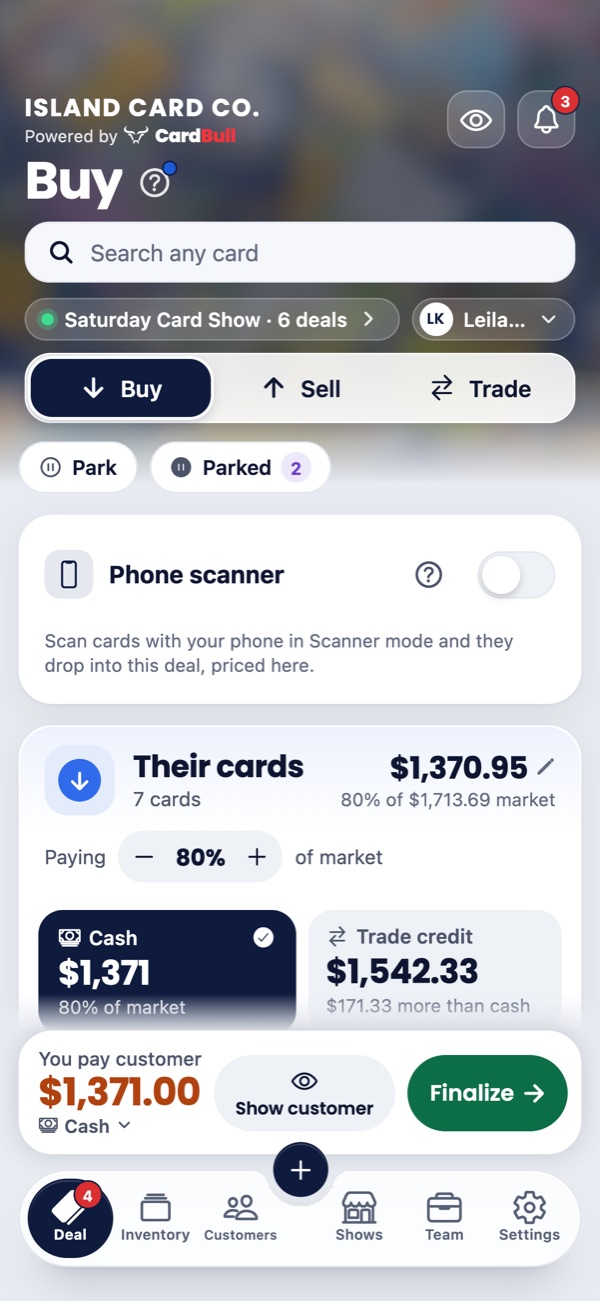
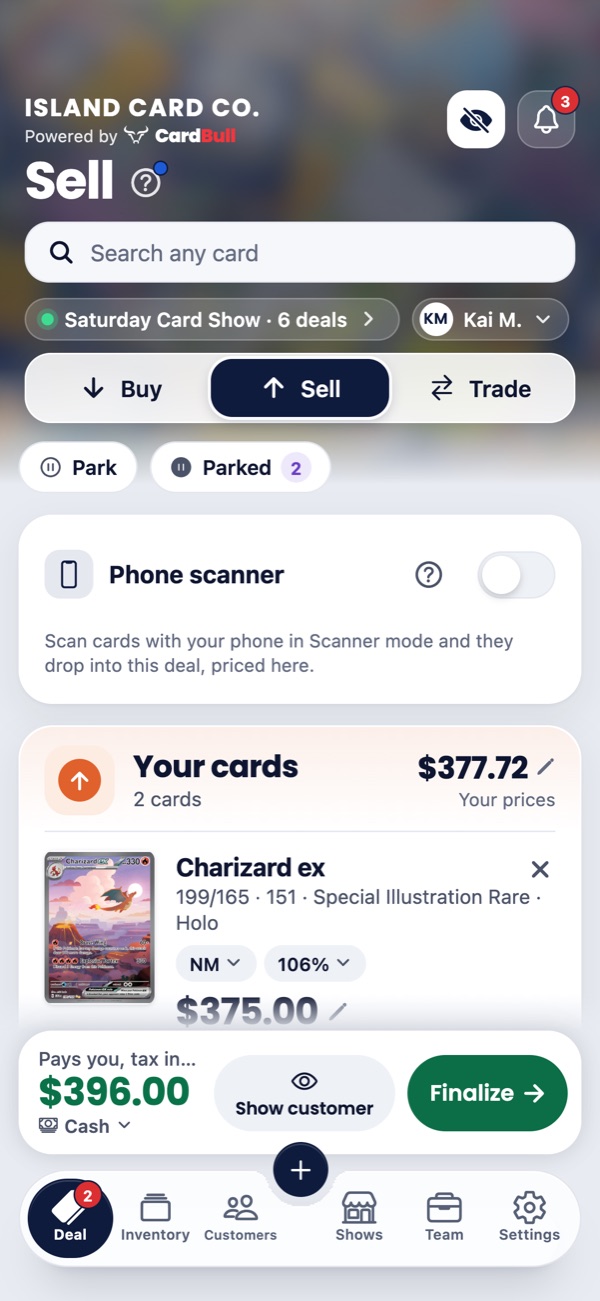
Their cards on one side, yours on the other. Trade credit and cash are worked out at your buy % and trade %. Show cash and trade credit side by side and let the customer pick. Agreed on a number? Type it and it’s spread across the cards. Turn the phone around for a summary they can accept, and it never shows your costs.

  • Cash or trade credit
  • Type the total
  • Even it out
  • Receipts
  • Park a deal
A Buy on an iPhone: the customer’s seven cards at 80% of market, with cash and trade credit offers side by side and the amount you pay.
Shows

Know what you made before you pack up.

Start a show and every deal counts toward it. Sales, profit, the cash box and expenses update live all day, with the table fee taken out so profit is real profit. Every show is saved with its report, so you can see which ones are worth the table.

  • Cash box
  • Expenses
  • Show reports
  • Tax & year-end report
  • Lock Screen card
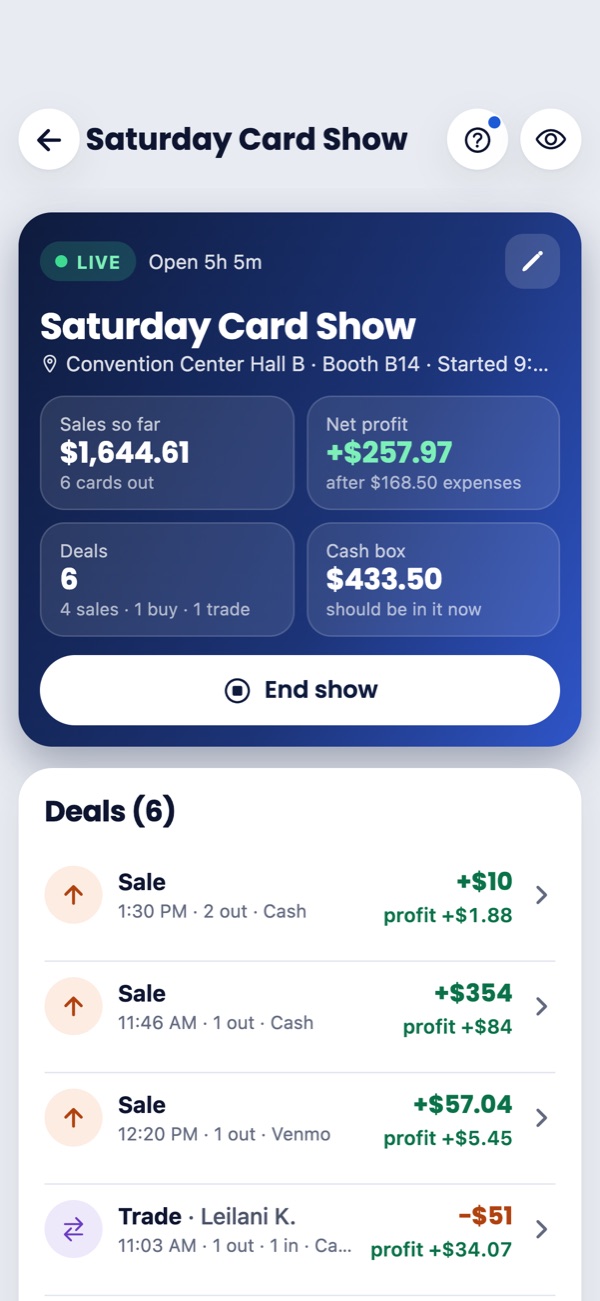
A live show on an iPhone: sales so far, net profit after expenses, the number of deals and what should be in the cash box, with the day’s deals listed below.
Team

Helpers at your table, on your terms.

Everyone signs in as themselves. Helpers deal and scan but never see what you paid or your profit, and they can raise a price but never lower it. Deals over an amount you choose wait for your OK, their sales buzz your phone, and the show report says who sold what.

  • Deal approvals
  • Show passes
  • Who sold what
  • Hide sales numbers
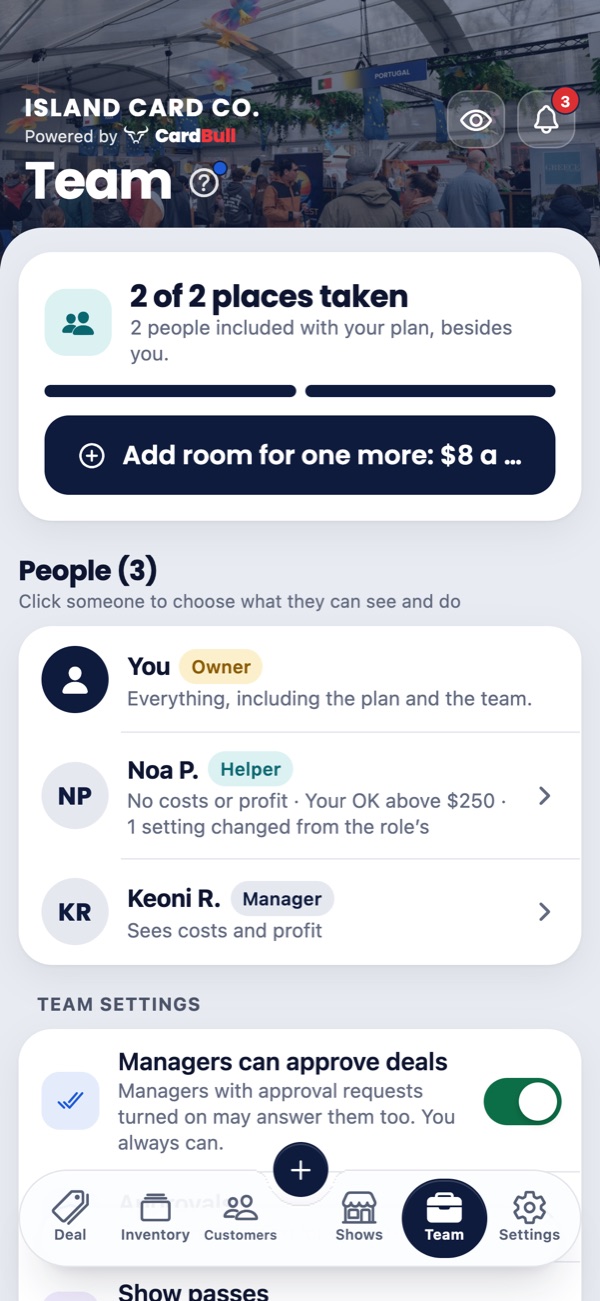
The Team screen on an iPhone: the owner, a helper who sees no costs or profit and needs an OK above $250, and a manager who sees costs and profit.
Past the table

Your case, on their phone.

Your cards for sale on a web page customers open by scanning the QR code at your table, with the cards you’re buying beside them. Text an offer that opens on any phone, hold a card with a deposit, and print price labels that scan straight into a sale.

  • QR table sign
  • Offers by text
  • Holds and layaway
  • Price labels
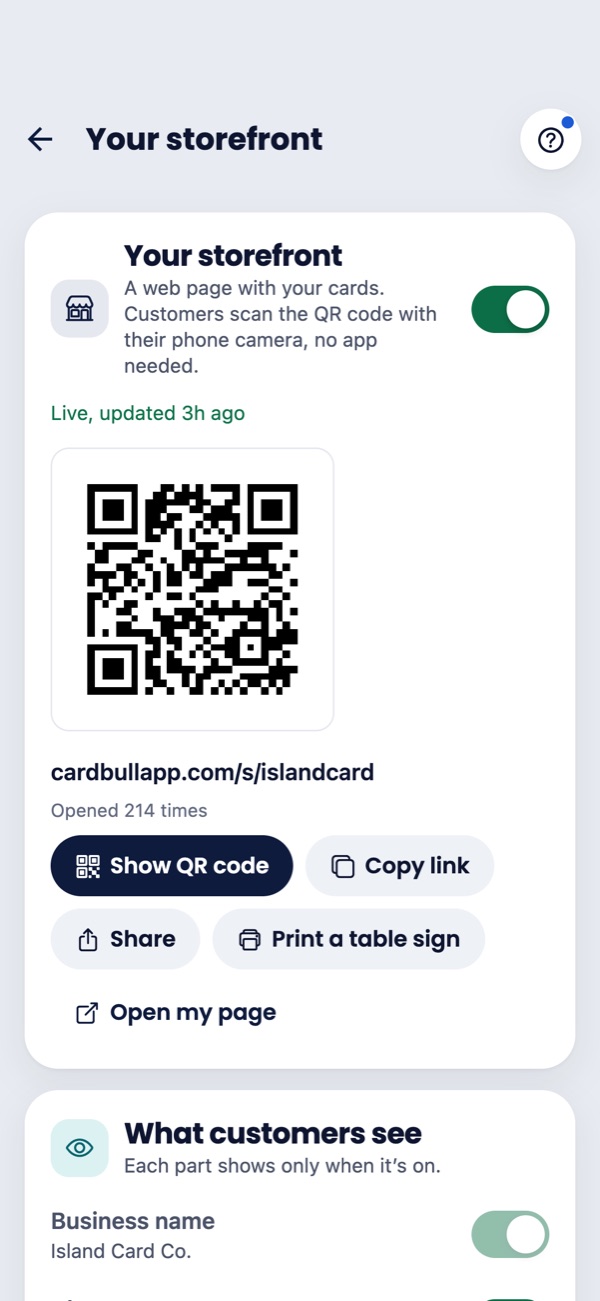
Your storefront in the app: the switch that puts your cards on a web page, its QR code and link, and buttons to share it or print a table sign.
On your computer

The same business on a big screen.

Log in at cardbullapp.com in any browser. Your deals, inventory, customers and shows are all there, across the full width of the screen, and a deal finished on the phone is on the computer about a second later. Run the deal on the computer and scan with your phone.

  • Nothing to install
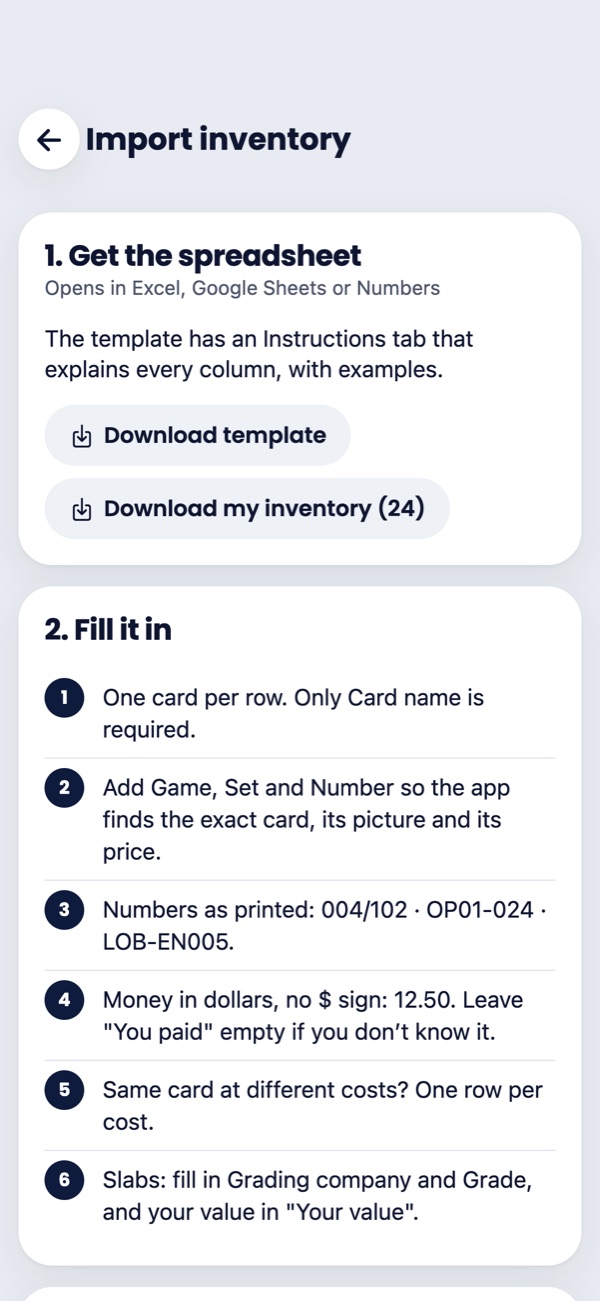
  • Import from Excel
  • Your phone as the scanner
  • Bulk edit
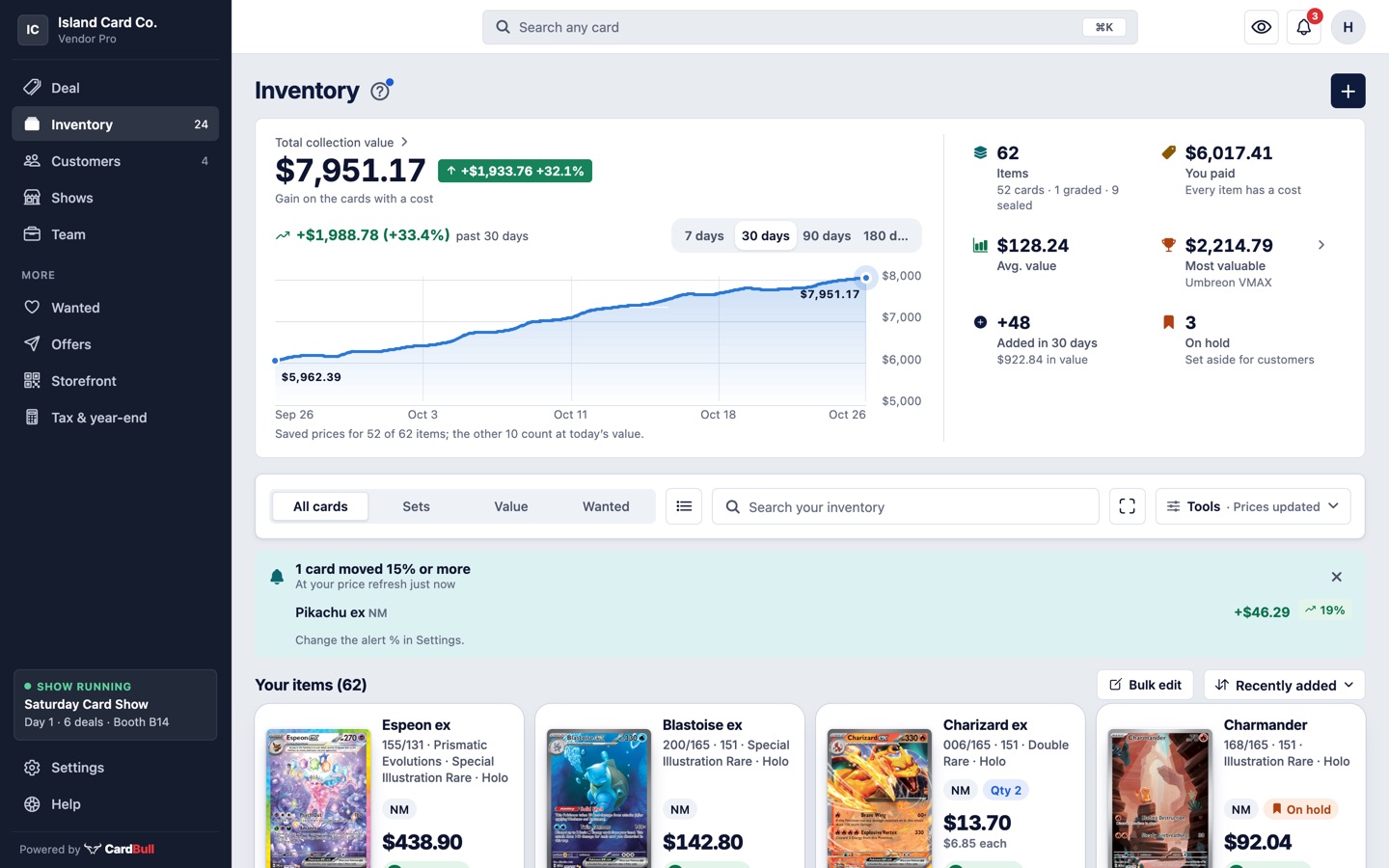
Inventory in a web browser on a computer: the total value, a value-over-time chart and the cards laid out as tiles across the width of the screen.
For collectors

Don’t sell? The collector side is free.

No deals, no cash box, no shows to run. Just your cards, what they’re worth today and the ones you’re still hunting. Free for up to 500 cards, with no end date.

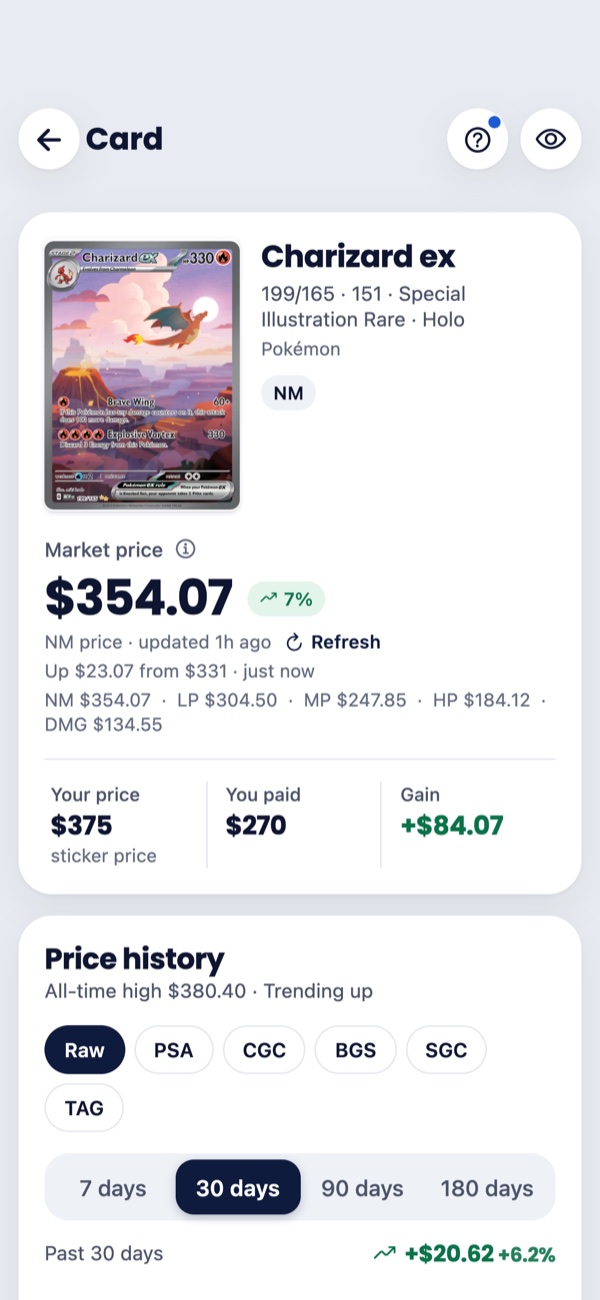
A card’s page on an iPhone: Charizard ex with today’s market price for Near Mint, how far it has moved, and its price history chart.
01 · Scan it

Know what it’s worth.

Hold a card up and it’s named and priced for its condition, with the price’s history and how far it has moved.

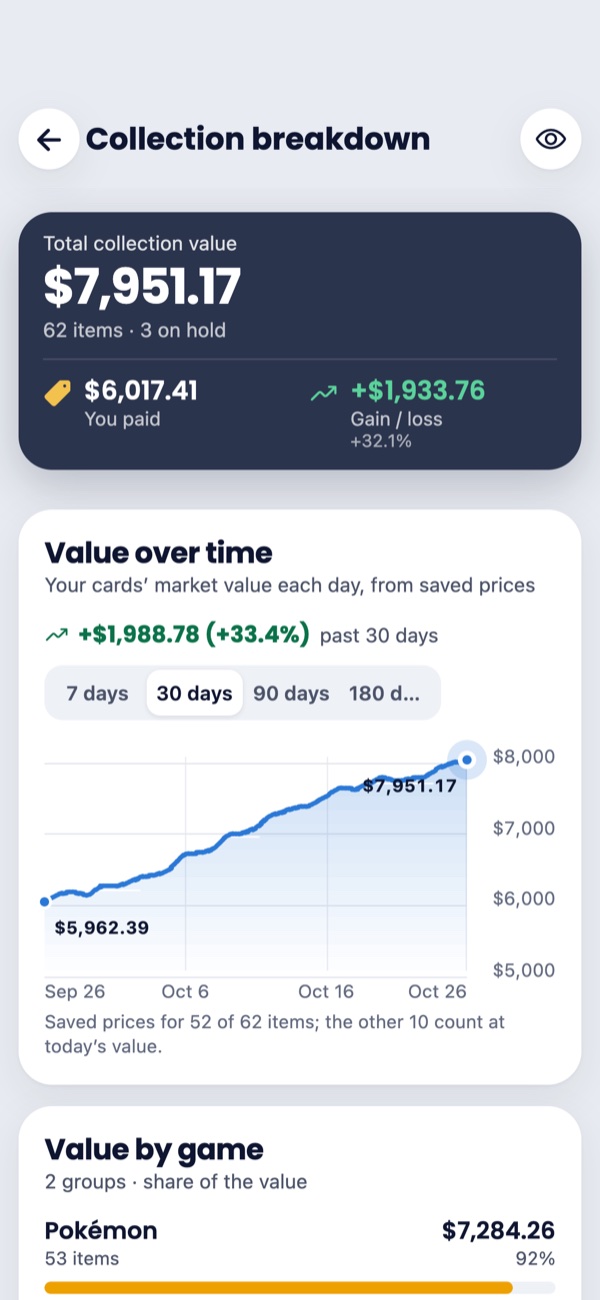
The collection breakdown on an iPhone: total collection value, what you paid and your gain, and a chart of your value over the last 30 days.
02 · Your collection

The whole binder, valued today.

What you paid, what it’s worth now and your gain, with your value over time and your biggest winners since the day you got them.

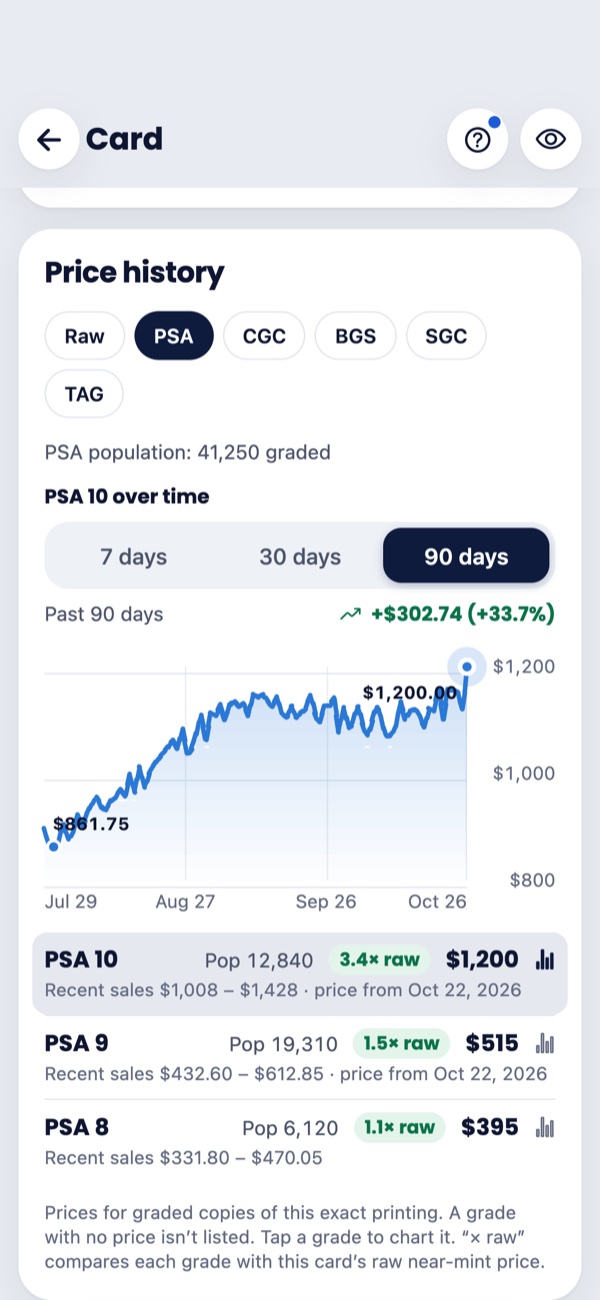
Graded prices on an iPhone: what a card sells for as a PSA 10, 9 and 8, how many times its raw price that is, and the PSA 10’s price over 90 days.
03 · Graded prices Collector Pro

Is it worth grading?

What the card sells for as a PSA 10, 9 or 8, and how many times its raw price that is.

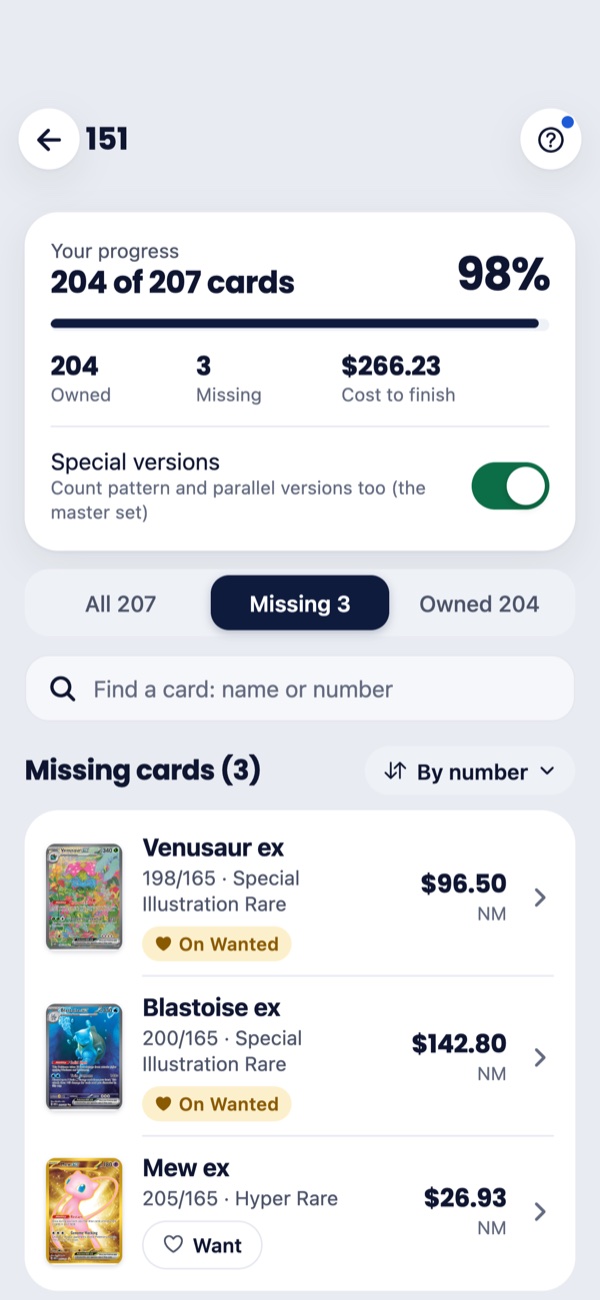
Complete this set on an iPhone: 204 of 207 cards owned, what the missing three cost, and each missing card with its price and an On Wanted tag.
04 · Complete this set

What’s missing, and what it costs.

What you own, what you still need and the price of finishing, for the main set or the master set.

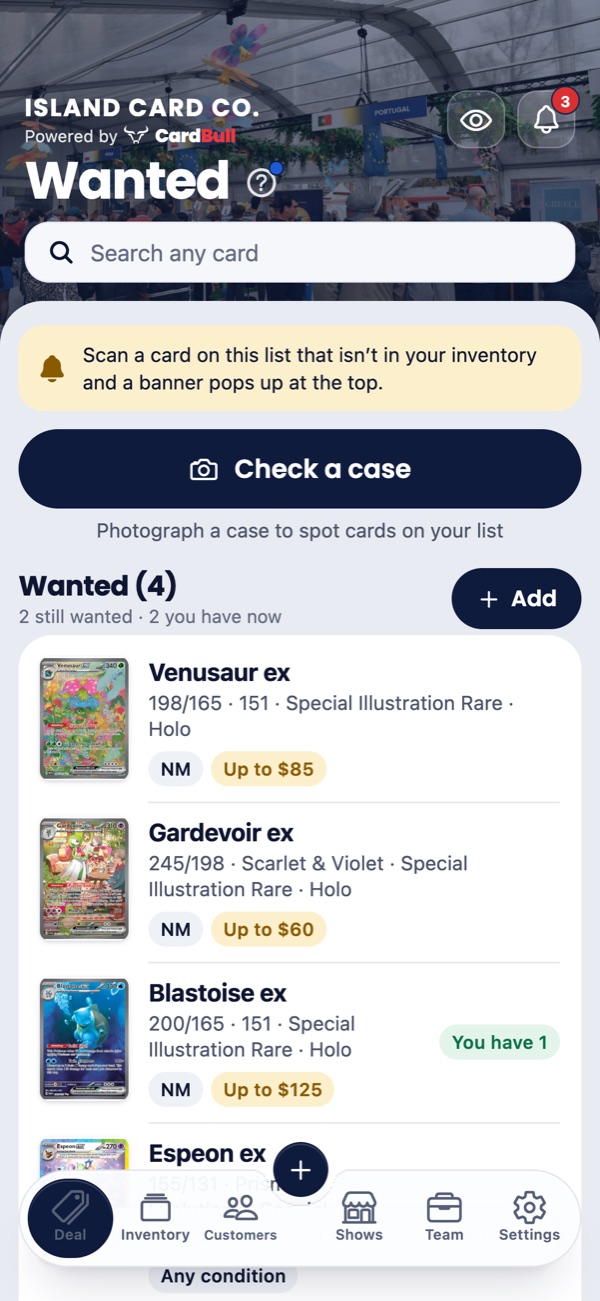
The Wanted list on an iPhone: each card with the most you’d pay, a Check a case button, and a note that a banner pops up when you scan one.
05 · Wanted list

Never walk past one you want.

The cards you’re hunting and the most you’d pay. Scan one, or sweep a whole case, and the app tells you. Price alerts say when a card moves, even with the app closed.

06 · Record

Film your pack opening.

Each pull’s picture and price pops up as you hold it up, with what you paid for the pack and how you did. Saves to Photos, ready to post.

Start collecting, freeOpen the web appNo card needed. Runs on iPhone and in any browser.

Collect and sell

Do both? Keep the two apart.Start selling later? Your collection stays yours.

Seller plans include a Collector side. Tap Switch to Collector at the top of Settings, and the cards you keep are stored apart from the cards you sell. They never show in a deal, on your storefront, on a price label or in a show report, and helpers never see them.

If you start selling one day, move up to a seller plan. Your collection stays on the Collector side, and the selling side starts empty. A card only moves over when you decide to sell it.

Try it here: tap Vendor, then Collector.
InventoryFor sale
Sylveon ex156/131 · Prismatic Evolutions · NM$387.80
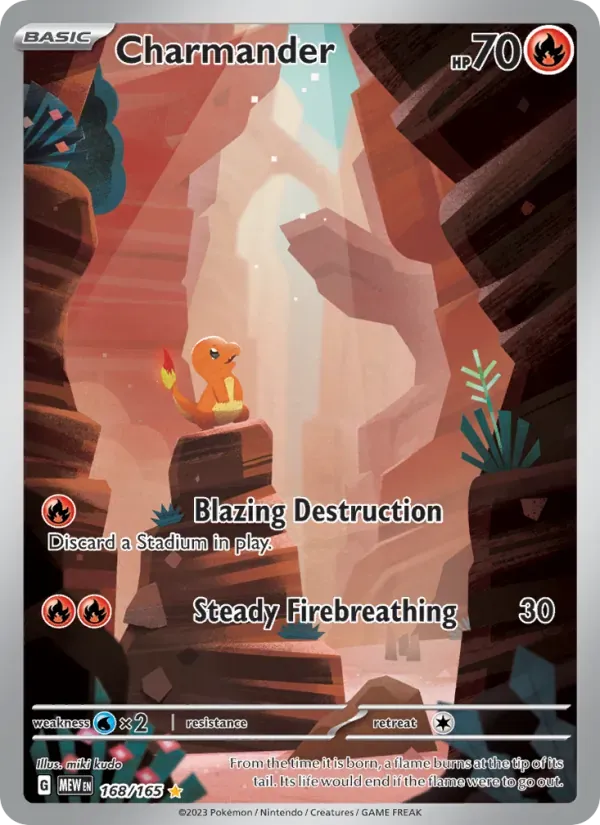
Charmander168/165 · 151 · NM$78.04

These cards show in:

  • Deals
  • Storefront
  • Price labels
  • Show reports
  • Your team
CollectionYours alone
Charizard ex199/165 · 151 · NM$291.76
151 Elite Trainer BoxSealed$487.51

These cards never show in:

  • Deals
  • Storefront
  • Price labels
  • Show reports
  • Your team
Case check

Point it at a whole case of cards.At a show? Point it at any case.Buying cards? Check the whole case first.

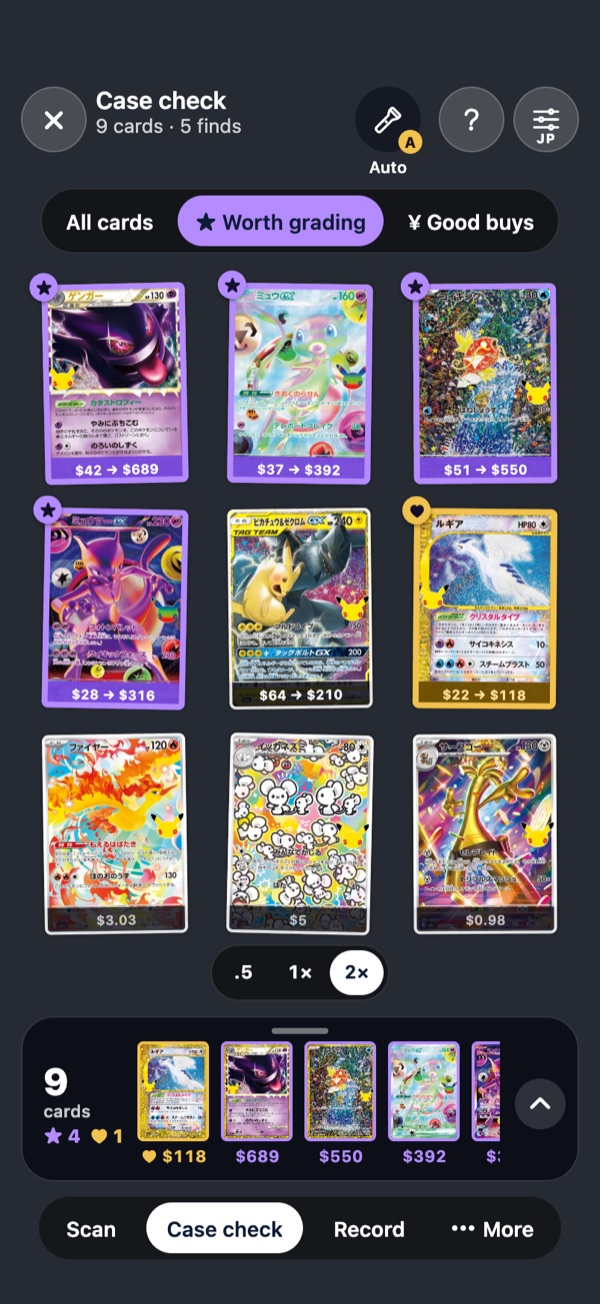
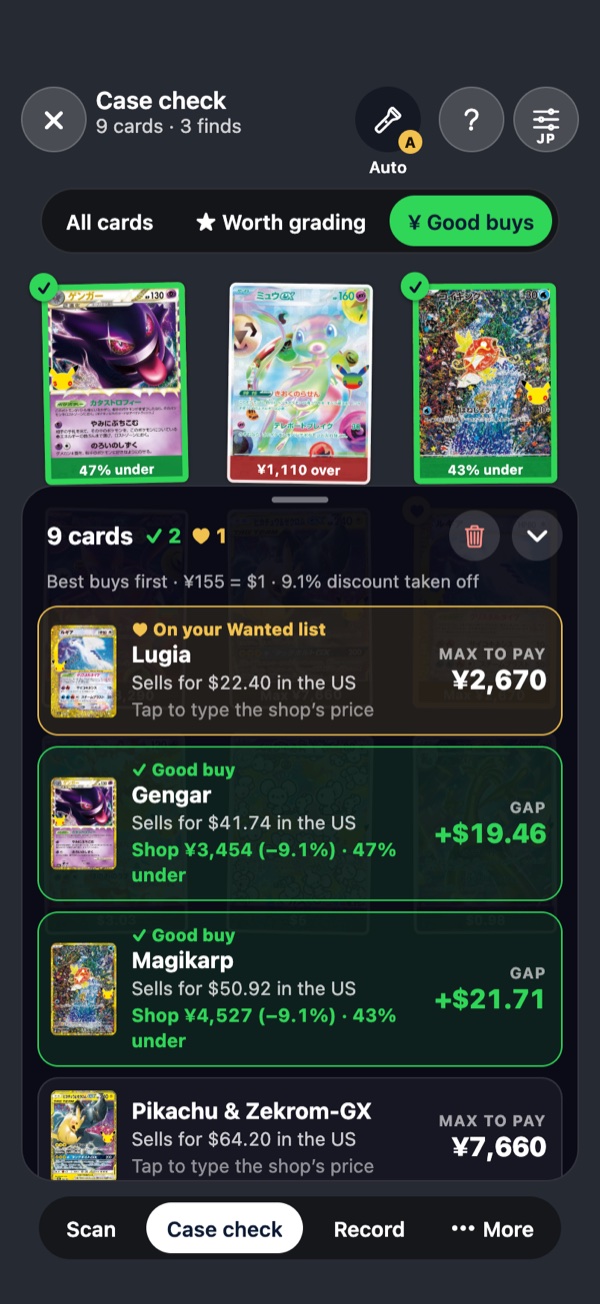
Move your iPhone along a display case or a binder page. Each card it reads turns green and shows its price. The ones worth a closer look get one of three marks.

  1. Worth gradingShows what the card sells for now next to what it sells for graded, so you can spot one worth sending in.
  2. On your Wanted listCards you’re looking for light up gold and your phone buzzes, so you never walk past one.
  3. Good buysType the seller’s price, in dollars or yen. It tells you if that’s a deal, and the most you should pay.
Case check on an iPhone, on Worth grading: nine cards in a case, four with a purple star and their raw price beside their graded price, one in gold from the Wanted list, and the cards read lined up along the bottom. Case check on an iPhone, on Good buys: the list of cards read, best buys first, each with what it sells for at home, the shop’s price, how far under that is, and the most to pay.
Record

Film your pack opening. Post it without editing.

Record films your opening and puts each card’s price, your pack count and your running total on the video while you film. When you stop, the video is finished: nothing to add in an editing app.

  1. Each price pops up as you pullHold a card up to the camera. Its price lands on the video right then, so you never type one in afterwards.
  2. A running total keeps scoreIt starts at what you paid for the packs. Red while you’re behind, green once your pulls put you ahead.
  3. Your pulls line up underneathThe last four, with their prices. Show every pull, only your hits, or no row at all.
  4. Finished the moment you stopIt saves to Photos, shaped for Reels, TikTok and Shorts. Share it as it is, then add every pull to your collection in one tap.

By the numbers

Games with live prices0Pokémon in English and Japanese, Magic: The Gathering, Yu-Gi-Oh! and One Piece
Conditions priced0Near Mint to Damaged, each from market
Cards at once0Sweep a case or a binder page with Case check
Cards on the free plan0Collector is free, with no end date
And the rest

Small things, done properly.

01

Find the cards worth having

Know what a card is worth before you buy it, and never walk past one you want.

  1. 1.1

    Price check

    Scan a card to see its price and how it’s moved, without adding it to anything.

  2. 1.2

    Wanted list

    The cards you’re hunting and the most you’d pay. Scan one, or spot one in a case, and the app tells you.

  3. 1.3

    Graded slabs

    Verify a PSA, BGS, CGC or SGC slab against the official cert and see its price by grade. Scan the slab’s barcode to fill it in.

  4. 1.4

    Find card shows

    Upcoming shows near you for the next three months, with hours and directions in your maps app. Selling at one? Set it up in a tap.

02

Sell past the table

Customers find you before the show and come back after it.

  1. 2.1

    Storefront and QR sign

    Your cards for sale on a web page customers open by scanning the QR code at your table, plus the cards you’re buying.

  2. 2.2

    Customers and their wants

    Every deal with someone in one place, and the exact cards they’re after, flagged when you have one.

  3. 2.3

    Holds and layaways

    Set a card aside for a customer, take a deposit, and finish the sale later.

  4. 2.4

    Your show on the Lock Screen

    The show’s name, hours and booth, with Scan and New deal buttons. Never your sales.

03

Get set up fast

Bring your cards over once, then let the phone do the typing.

  1. 3.1

    Bring your cards

    Import from Excel, CSV or a Holodex export. Nothing is added until you’ve checked the list, and an import can be undone.

  2. 3.2

    Share a photo to scan it

    Share a card photo or screenshot from Photos or Safari and the app reads the card.

  3. 3.3

    Siri and Shortcuts

    Open the scanner or Bulk Scan, or start and end a show, by voice, the Action button or Back Tap.

  4. 3.4

    A ? on every screen

    Tap it to see what each button does and how to use it, with tours and a help center.

04

Your numbers stay yours

What you paid and what you made never show unless you want them to.

  1. 4.1

    Hide my numbers

    One tap on the eye hides what you paid and your profit on screen, and Face ID locks the app when you leave it.

  2. 4.2

    Sign in without a password

    A passkey with Face ID, Sign in with Apple or Google, or a code sent to your email. See every device signed in, and sign any of them out.

  3. 4.3

    No ads. No selling your data.

    No tracking cookies, and we never look at your deals, costs, profit, inventory or customers. Read the Privacy Policy.

  4. 4.4

    Bring a vendor, get a month free

    Share your invite link. They sign up free during launch,They get 30 days free instead of 3, and when they make their first payment, a month is credited to your bill.

Pricing

Free for collectors.
Plans for every table.

Free during launch. Sign up now: collectors get Collector Pro and vendors get Vendor Pro, with nothing charged and no card needed. The prices below start later: monthly, cancel anytime.Monthly plans, cancel anytime. The free trial is 3 days of Vendor Pro, 30 if a vendor invited you, and no card is needed. Paid plans open soon, on this website and, once the app is on the App Store, in the app.Subscribe in the iPhone app through the App Store, or on this website.

Founders: Vendor Pro for $14 a month instead of $19, locked in while you stay subscribed. For the first 50 vendors who subscribe on this website. If you cancel or switch plans, founder pricing ends.

All 50 founder spots are claimed.

of 50 founder spots left

Every plan includes

  • Pokémon (English and Japanese), Magic, Yu-Gi-Oh! and One Piece, sealed products too
  • Scan cards with your iPhone camera, one at a time or a whole stack
  • Bulk Scan: many cards from one photo
  • Case check: spot your Wanted cards in a whole display case
  • Record your pack openings, with each pull’s price on screen
  • Collection value and gain, with what you paid
  • Complete this set and price movers
  • Slab tracking with cert check
  • Wanted list with scan alerts
  • Export to a spreadsheet (CSV)
  • Sync between phone and web

Collector

Track your collection, free.

Free

Start free Go to your account

No card needed.

Free, with no end date.

What’s included:

  • Up to 500 cards
  • 25 AI checks a month
  • 200 Continuous scan cards a month
  • 30 days of price history

Collector Pro

Free during launch

For serious collectors.

$4.99a month

Start free Go to your account

Free during launch. No card needed.

Free during launch. Nothing is charged.

Everything in Collector, plus:

  • Unlimited cards
  • 75 AI checks a month
  • Unlimited Continuous scan cards
  • 180 days of price history, growing
  • Graded (slab) prices
  • Price alerts
  • Apple Watch app

Vendor

Free during launch

Buy, sell and trade at your table.

$9.99a month

Start free Go to your account

Free during launch. No card needed.

Free during launch. Nothing is charged.

Everything in Collector Pro, plus:

  • 150 AI checks a month
  • Buy, sell and trade, with receipts
  • Shows, cash box and show reports
  • Buy, sell and trade rates
  • Business name, profile and receipts
  • Invite vendors
  • Print price labels
  • Tax and year-end reports
  • Excel export
  • Your show on the Lock Screen, with Scan and New deal buttons

Compare plans

What’s includedCollectorFreeCollector Pro$4.99 a monthVendor$9.99 a monthVendor Pro$19 a month
Cards500UnlimitedUnlimited
AI checks a monthExtra help naming hard-to-read cards, and Bulk Scan photos.2575150
Continuous scan cards a monthScan a stack card after card, without tapping.200UnlimitedUnlimited
Price history30 days180 days, growing180 days, growing
Graded pricesWhat a card sells for graded by PSA, CGC, BGS and more.Not includedIncludedIncluded
Price alertsHear when a card’s price moves.Not includedIncludedIncluded
Buy, sell and tradeDeals with receipts, at your table or anywhere.Not includedNot includedIncluded
Shows and cash boxNot includedNot includedIncluded
Deals open at onceStart a new deal while another one waits.Not includedNot includedOne at a time
Print labelsNot includedNot includedIncluded
Tax and year-end reportsNot includedNot includedIncluded
Excel exportNot includedNot includedIncluded
Price tiersPay a different % depending on what a card is worth.Not includedNot includedNot included
Customers, holds, layawayNot includedNot includedNot included
Storefront and offersYour own page of cards for sale, with a QR sign for your table.Not includedNot includedNot included
Team members (later)Not includedNot includedNot included
  • Change plans anytime. Nothing is deleted when you move to a smaller plan: the parts it doesn’t include are kept, hidden until you move back.
  • Invited by a vendor? Your free trial is 30 days instead of 3.
  • Pay where you like. Once plans open: by card on this website, or in the app through the App Store once it is there.Through the App Store in the iPhone app, or by card on this website. Either way the plan works in the app and on the web for the same account.
Questions

Things people ask.

Still have a question? See the help center or email us.

Is there a free plan?

Yes. Collector is free, with no end date: up to 500 cards, scanning with your phone plus 25 AI checks a month, your collection’s value, the Wanted list, and sync between your phone and the web. You can start the free trial from your account whenever you like.

I collect and I sell. Do I need two accounts?

No. Every vendor plan has a Collector side: tap Switch to Collector at the top of Settings. Your own collection is kept apart from what you sell, so it never shows in a deal, on your storefront, on a price label or in a show report, and helpers never see it. Move a card across when you decide to sell it.

I only collect. Is this for me?

Yes. Sign up as a collector and the app is just your collection: scanning, what each card and the whole collection is worth, the Wanted list and Case check. There are no deals, shows or customers to set up. Collector is free for up to 500 cards.

Do I need a credit card to start?

No. Everything is free during launch: collectors get Collector Pro and vendors get Vendor Pro, and no card is asked for. When plans open, you choose one or stay on Collector, free.

No. The free trial gives you Vendor Pro for 3 days, or 30 if another vendor invited you. You only add a card when you choose a plan, and the Collector plan never needs one. If you subscribe during the trial, the days you had left are added free when your paid plan ends.

What happens when my trial ends?

You move to Collector, the free plan, unless you’ve chosen a plan. Everything is kept: your cards stay, and deals, shows and customers come back when you pick a plan that has them.

Where do the prices come from?

Market prices update every day and follow the condition you pick (NM, LP, MP, HP or DMG), for every game we cover. They’re a guide, not an offer: you always set the final price. A price with little behind it is marked as an estimate. See Data sources & credits.

Which games does it cover?

Live prices cover Pokémon (English and Japanese), Magic: The Gathering, Yu-Gi-Oh! and One Piece, sealed products included. Anything else can be added by hand at your own price. Japanese Pokémon cards are recognised and priced on their own, kept apart from their English versions. Graded slab prices come with Collector Pro and every plan above it.

How does the card scanner work?

Point your iPhone camera at a card and it’s recognised and priced, usually in about a second. Use Snap for one card at a time, or Continuous for a stack, with each card dropping into a drawer. Bulk Scan reads 8 to 10 cards from one photo, and Case check sweeps a whole case: every card gets its price, and cards on your Wanted list, cards worth grading and good buys are marked. A card that isn’t recognised can be identified with an AI check, which sends its photo once you allow it. You always confirm a card before it’s added.

Does my phone tell me when a card sells?

Yes, if you turn it on. Turn on Deals under Notifications and a sale, buy or trade finalized on another of your devices, like the iPad at the table, sends your phone a notification: what went each way and how the customer paid. A deal made by someone on your team arrives with their name. Turn on Show profit in notifications and it ends with the profit; that part is off until you choose it, since anyone at the table can see a Lock Screen.

Can customers see my costs?

No. The customer summary and receipts never show costs or profit, and one tap on the eye hides what you paid and your profit on your own screen.

Does it work on iPad, Android or a computer?

The app runs on iPhone and iPad. The web app works on Android phones and on any computer, and everything stays in sync. The iPhone app is in beta and coming soon to the App Store.The iPhone app is on the App Store.

Can my staff use it?

Team members are coming later as part of Vendor Pro.Yes. With Vendor Pro, helpers at your table each get their own login. Helpers make deals and scan but never see what you paid or your profit, and they can raise a price but not lower it. Deals over an amount you choose wait for your OK.

How do I cancel?

Anytime. From your account on this website, or, if you subscribed in the app, under Settings › your name › Subscriptions on your iPhone. Your plan keeps working until the end of the month you’ve paid for, then you’re on the free Collector plan with everything kept.

Do you track me?

No. There are no ads and no tracking cookies in the app or on this website, and no third-party analytics in the app. Our hosting provider counts visits to this website’s pages, without cookies and without knowing who you are. Our own server notes which days your account is used and the rough area you signed up from, and never follows you to other sites or apps. We never look at your deals, costs, profit, inventory or customers. Details are in the Privacy Policy.

What happens if I lose my phone?

Your data is backed up to your account. Log in on your new iPhone, or in a browser, to restore it. You can delete your account and its backup at any time, in the app or on your account page.

Try it at your
next show.
Scan your first card
tonight.

Free during launch.3 days free.Free access with your invite. No card needed. Cancel anytime.

The iPhone app is in beta and coming soon to the App Store.The iPhone app is on the App Store. Already have an account? Log in